.NET Integration Guide
Table of Contents
- Overview
- .NET Integration
- PortDic Features
- Project Execution
- Package Development
- Summary
Overview
This guide provides comprehensive information for integrating .NET applications with the Port system. It covers initialization, event handling, package development, and project execution.
.NET Integration
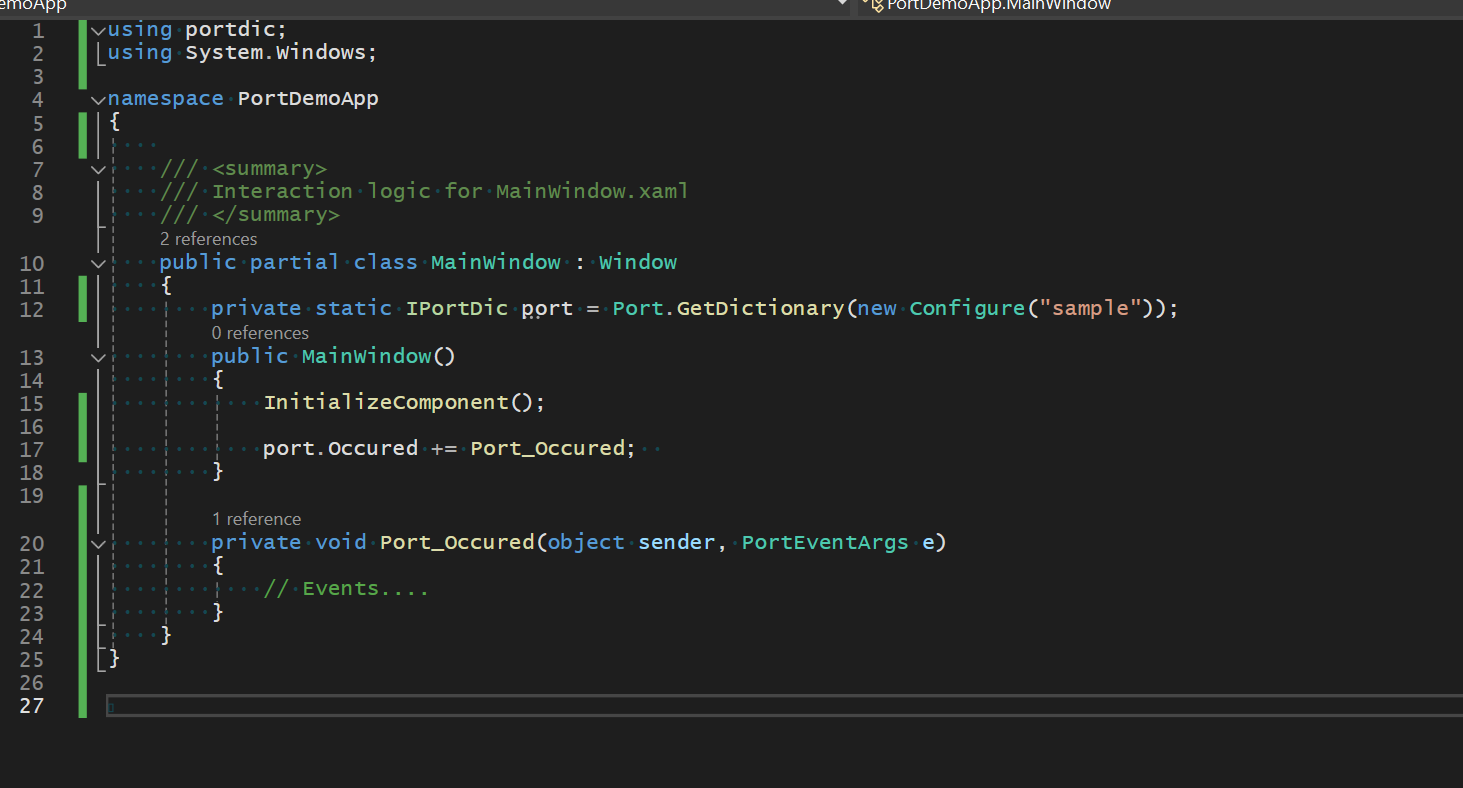
Initialization and Setup
private static IPortDic port = Port.GetDictionary("sample");

public Form()
{
   InitializeComponent();

   // Event handlers
   port.OnOccurred += Port_OnOccurred;
   port.OnStatusChanged += Port_OnStatusChanged;

   // Start the Port system
   port.Run();
}
Event Handling
Status Change Events
/// <summary>
/// The OnStatusChanged event notifies when the port server status changes.
/// Provides details through PortStatusHandler.
/// </summary>
private void Port_OnStatusChanged(object sender, PortStatusArgs e)
{
    switch (e.Status)
    {
        case PortStauts.Initializing:
            break;
        case PortStauts.Running:
            OnReady = true;
            break;
        case PortStauts.Stopped:
            break;
        case PortStauts.Shutdown:
            break;
        case PortStauts.Failed:
            break;
    }
}
Occurrence Events
/// <summary>
/// The OnOccurred event handles system events and messages.
/// Provides event details through PortEventArgs.
/// </summary>
private void Port_OnOccurred(object sender, PortEventArgs e)
{
    switch (e.EventType)
    {
        default:
            Console.WriteLine(e.Message);
            break;
    }
}
Test Package Integration
private static IPortDic port = Port.GetDictionary("sample");

public Form()
{
  InitializeComponent();

  // Test Mode: Heater Class with messages
  port.Test("Heater1", new Heater());

  port.OnOccurred += Port_OnOccurred;
  port.OnStatusChanged += Port_OnStatusChanged;

  port.Run();
}
SET/GET Operations
// Setting values
var ok = dic.Set("room1", "BulbOnOff", "On");
if(ok){
    Console.WriteLine("ok");
}

// Getting values - returns 'On'
Console.WriteLine(dic.Get("room1", "BulbOnOff").Text());

// Alternative syntax
port["room1"].Set("BulbOnOff", "Off");

// Getting values - returns 'Off'
Console.WriteLine(dic.Get("room1", "BulbOnOff").Text());

// Getting temperature values
var t1 = dic.Get("room1", "RoomTemp1");
// random number unit Celsius
Console.WriteLine(t1.Text());

var t2 = dic.Get("room1", "RoomTemp2");
// random number unit Fahrenheit
Console.WriteLine(t2.Text());
PortDic Features
| Feature | Description |
|---|---|
| Efficient Lookup | Fast key-value pair retrieval |
| Multi-platform Support | Available across different programming languages |
| Real-time Updates | Live data synchronization |
| Event-driven Architecture | Responsive to system changes |
| Test Mode Support | Package testing and validation |
| Type Safety | Proper data type handling and conversion |
Project Execution
Repository Updates
Before starting your project, ensure all changes are committed to the repository:
port push
Console Execution
Starting the Server
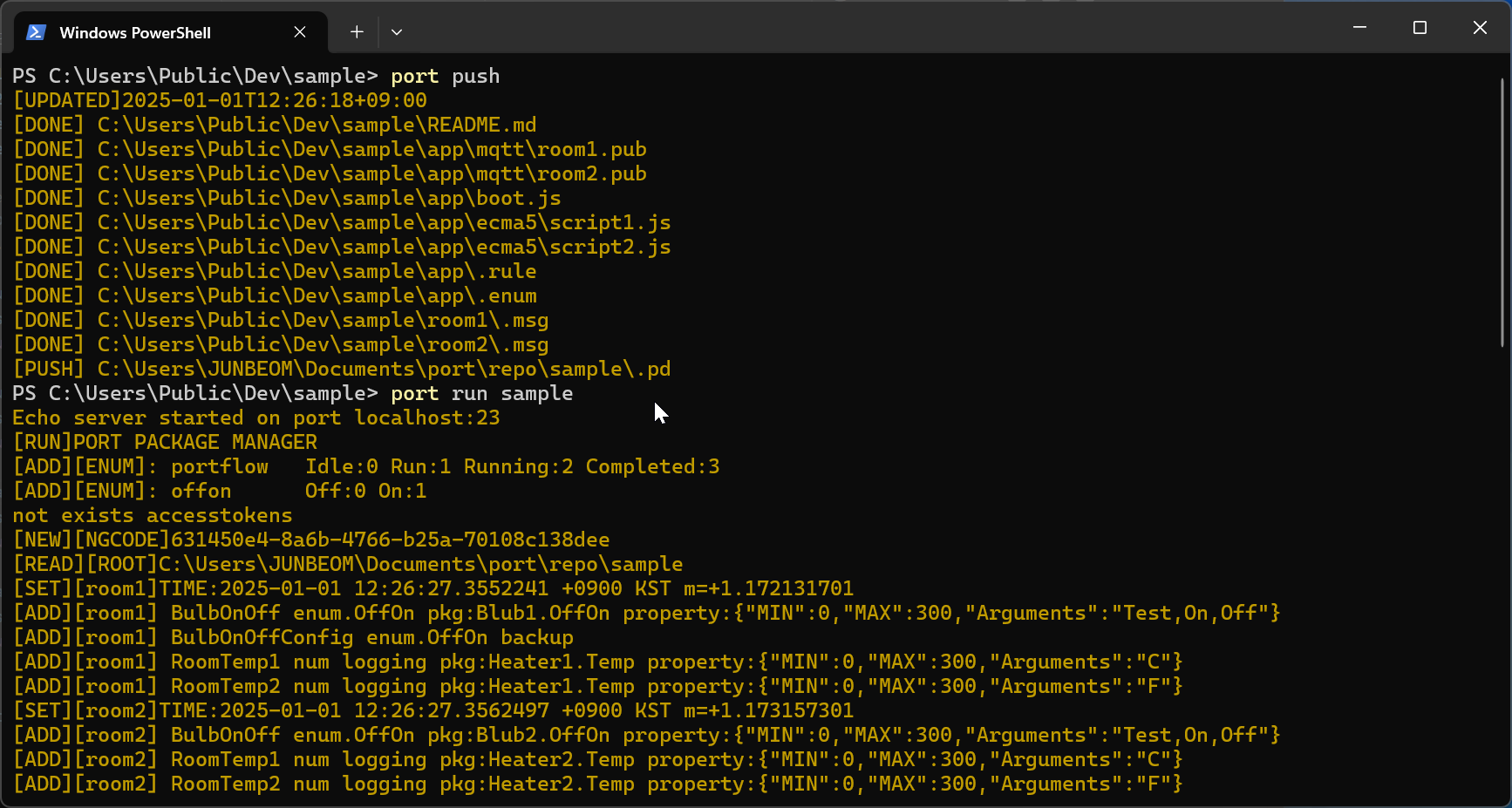
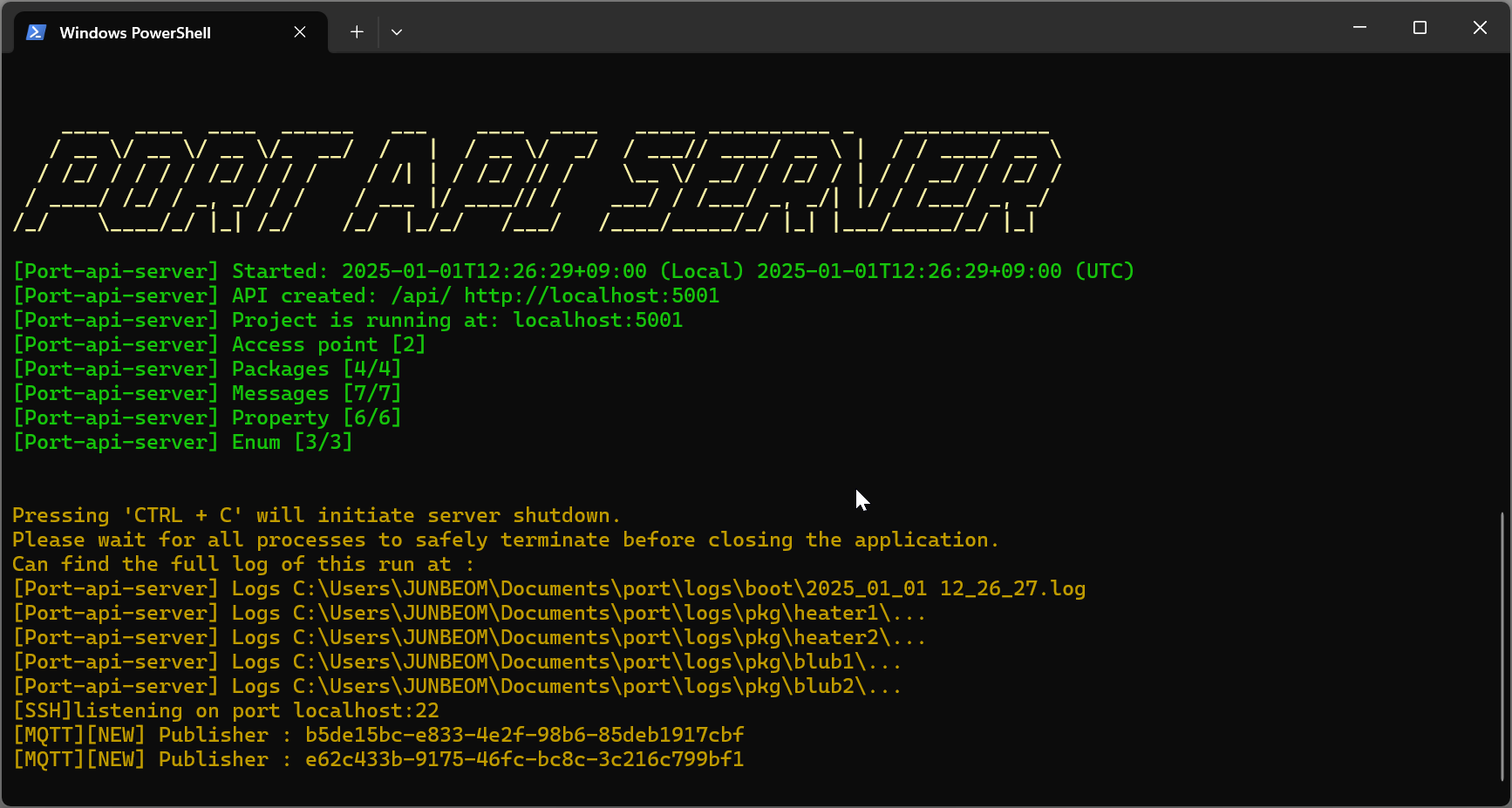
Command:
port run [project-name]
Process:
- Upload Changes: Use
port pushto sync repository - Start Server: Execute
port run [project-name] - Verify Operation: Check console output for success/error messages
Error Handling
!!! tip "Error Summarization"
Use --ng ignore flag to summarize only error points:
bash port run [project-name] --ng ignore
**Detailed Error Analysis:**
Visit [http://localhost:5001/api/app/ng/?view=table](http://localhost:5001/api/app/ng/?view=table) for comprehensive error details.
GUI Application
WPF Application Execution
Package Development
Package Development Overview
The Port package system allows developers to create reusable libraries by inheriting from PortObject and linking them to Entries. This enables straightforward usage through entry calls and promotes modular development.
Port packages provide a standardized way to:
| Capability | Description |
|---|---|
| Create reusable components | Build modular libraries for repeated use |
| Manage dependencies and configurations | Handle package dependencies and settings |
| Enable seamless integration | Integrate smoothly with the Port ecosystem |
| Facilitate API-driven interactions | Support REST API-based communication |
Package Annotations System
Port packages use annotations to define behavior, configuration, and API endpoints. These annotations provide metadata that the Port system uses for:
| Feature | Description |
|---|---|
| Class Registration | Identifying Port-managed classes |
| API Generation | Creating REST endpoints automatically |
| Dependency Injection | Managing services and resources |
| Validation | Ensuring data integrity and business rules |
Annotation Reference
| Name | Targets | Type | Arguments | Description |
|---|---|---|---|---|
| Package | class | - | Class Type | Declares a class as Port-managed for package registration |
| API | property, field | EntryDataType | dataType, format, keys | Creates API endpoints for property access |
| Property | property | IProperty | - | Maps properties to pre-declared Entry Properties |
| Logger | property | ILogger | - | Enables dependency injection for logging services |
| Flow | class | - | Class Type | Marks a class as a workflow or process flow |
| Import | field, property | - | packageName, key | Marks dependencies requiring specific functions from packages |
| Step | method | - | index, relatedEntry | Marks methods as workflow steps with execution order |
| StepTimer | property | IStepTimer | - | Enables timing and scheduling for workflow steps |
| FlowControl | property | IFlowControl | - | Provides flow control and navigation capabilities |
| Valid | method, property | bool | invalid comment | Defines validation logic with custom error messages |
| EnumCode | enum | - | using | Exposes enum values through API endpoints |
| Comment | property | - | comment text | Provides API documentation for properties |
| Mapping | property | - | type | Maps properties to specific data types |
| ModelProperty | field, property | - | portKey | Marks fields/properties as data model properties |
Detailed Annotation Usage
Valid Annotation
The Valid annotation defines validation logic for methods or properties, with custom error entry for validation failures.
[Valid("Invalid for connection")]
public bool Valid()
{
    return true;
}
Usage:
| Aspect | Description |
|---|---|
| Target | Applied to methods returning bool |
| Error Handling | Provides custom error entries for validation failures |
| Execution | Automatically called during package validation |
Package Annotation
The Package annotation marks a class as a managed package within the Port Dictionary system. Classes decorated with this attribute are automatically instantiated, managed, and made available for interaction within the Port Application ecosystem.
using portpackage;
using portdatatype;

[Package(typeof(DataProcessingService))]
public class DataProcessingService
{
    [API(EntryDataType.Text)]
    public string ProcessData { get; set; }

    [Step(1, "InputData")]
    public void ProcessInput()
    {
        // Processing logic
    }
}
Usage:
| Aspect | Description |
|---|---|
| Target | Applied to class declarations |
| Registration | Registers the class with the Port system |
| Functionality | Enables package management and API generation |
| Lifecycle | Automatic instantiation and lifecycle management |
Flow Annotation
The Flow attribute marks a class as a workflow or process flow within the Port Dictionary system. Classes decorated with this attribute are automatically managed as sequential or parallel execution flows, enabling complex business process automation and step-by-step execution control.
[Flow(typeof(ManufacturingProcess))]
public class ManufacturingProcess
{
    [StepTimer]
    public IStepTimer Timer { get; set; }

    [FlowControl]
    public IFlowControl FlowControl { get; set; }

    [Step(1, "StartProcess")]
    public void InitializeProcess()
    {
        // Initialization logic
    }

    [Step(2, "ProcessData")]
    public void ProcessData()
    {
        // Data processing logic
        if (errorCondition)
            FlowControl.JumpStep(5); // Jump to error handling
    }

    [Step(5, "HandleError")]
    public void HandleError()
    {
        // Error handling logic
    }
}
Usage:
| Aspect | Description |
|---|---|
| Target | Applied to class declarations |
| Flow Management | Automatic step sequencing and execution control |
| Integration | Timer-based operations and scheduling support |
| Control | Conditional flow branching and jumping |
Import Annotation
The Import attribute marks a class, property, or field as requiring a specific function from a named package. This attribute enables dependency injection and automatic resolution of inter-package dependencies within the port dictionary system.
public class DataProcessor
{
    [Import("MathReferences", "Calculator")]
    private IFunction calculator;

    [Import("LoggingReferences", "FileLogger")]
    public IFunction Logger { get; set; }

    public void ProcessData()
    {
        var result = calculator.Binding("ProcessingData");
        Logger.Binding("LogProcessingResult");
    }
}
Usage:
| Aspect | Description |
|---|---|
| Target | Applied to fields and properties |
| Dependency Injection | Automatic function resolution at runtime |
| Modular Architecture | References-based package dependencies |
| Documentation | Compile-time dependency documentation |
Step Annotation
The Step attribute marks a method as a step in a workflow sequence that will be automatically executed by the Flow system in the order specified by the index parameter. This attribute enables the creation of sequential or conditionally branching workflows with precise execution control.
[Flow(typeof(ManufacturingProcess))]
public class ManufacturingProcess
{
    [Step(1, "InitializeSystem")]
    public void Initialize()
    {
        // Initialization logic
    }

    [Step(2, 1001, "ProcessMaterial", "QualityCheck")]
    public void ProcessMaterial()
    {
        // Processing logic with collection event 1001
    }

    [Step(10, "FinalizeProcess")]
    public void Finalize()
    {
        // Finalization logic
    }
}
Usage:
| Aspect | Description |
|---|---|
| Target | Applied to methods only |
| Execution Order | Index determines execution order (lower indices execute first) |
| Integration | Flow control and timing systems support |
| Events | Collection event integration for advanced monitoring |
StepTimer Annotation
The StepTimer attribute specifies that a property should be injected with a timing system for workflow steps. This enables precise timing control, delayed execution, and one-time action scheduling within the flow execution context.
[Flow(typeof(TimedProcess))]
public class TimedProcess
{
    [StepTimer]
    public IStepTimer Timer { get; set; }

    [Step(1)]
    public void StartProcess()
    {
        // Schedule a timeout action
        Timer.Reserve("timeout", 5000, () => HandleTimeout());

        // Execute something once
        Timer.Once("initialize", () => InitializeResources());
    }

    private void HandleTimeout()
    {
        Console.WriteLine($"Process timed out after {Timer.TotalSeconds} seconds");
    }
}
Usage:
| Aspect | Description |
|---|---|
| Target | Applied to IStepTimer properties |
| Timing Features | Precise timing and elapsed time measurement |
| Scheduling | Delayed action execution with millisecond precision |
| One-time Actions | One-time action scheduling with duplicate prevention |
FlowControl Annotation
The FlowControl attribute specifies that a property should be injected with flow control capabilities for workflow navigation. This enables dynamic navigation between steps, conditional logic, error handling, and non-linear execution patterns.
[Flow(typeof(DataProcessingFlow))]
public class DataProcessingFlow
{
    [FlowControl]
    public IFlowControl FlowControl { get; set; }

    [Step(1)]
    public void ValidateData()
    {
        if (dataIsInvalid)
            FlowControl.JumpStep(99); // Jump to error handling step
    }

    [Step(99)]
    public void HandleError()
    {
        // Error handling logic
    }
}
Usage:
| Aspect | Description |
|---|---|
| Target | Applied to IFlowControl properties |
| Control Features | Dynamic step jumping for conditional workflows |
| Error Handling | Error handling and recovery mechanisms |
| Branching | Loop and branching control structures |
Logger Annotation
The Logger annotation specifies that a field should be injected with a logging system or service.
using portpackage;
using portdatatype;

[Logger]
public ILogger Logger { get; set; }

// Usage example
Logger.Write(string.Join(",", values));
Usage:
| Aspect | Description |
|---|---|
| Target | Applied to ILogger properties |
| Injection | Enables dependency injection for logging |
| Capability | Provides centralized logging capabilities |
Property Annotation
The Property annotation maps a property to declared Message Properties for configuration access.
using portpackage;
using portdatatype;

[Property]
public IProperty Property { get; set; }

// Usage example
if (this.Property.TryToGetValue("Unit", out string value))
{
    // Handle configuration value
}
Usage:
| Aspect | Description |
|---|---|
| Target | Applied to IProperty properties |
| Access | Enables access to configuration values |
| Retrieval | Supports key-value property retrieval |
API Annotation
Properties declared with API annotation become API endpoints, accessible via REST API. This attribute marks a property as an API endpoint within the Port Dictionary system, enabling automatic API registration and discovery.
using portpackage;
using portdatatype;

[Package(typeof(SensorController))]
public class SensorController
{
    [API(EntryDataType.Num)]
    public double Temperature { get; set; }

    [API(EntryDataType.Text, PropertyFormat.Json, "Status", "ErrorCode")]
    public string SystemStatus { get; set; }

    [API(EntryDataType.List, PropertyFormat.Array, 0, 1, 2)]
    public List<string> SensorReadings { get; set; }
}
Usage:
| Aspect | Description |
|---|---|
| Target | Applied to properties and fields |
| API Generation | Creates REST API endpoints automatically |
| Type Safety | Type-safe data handling with EntryDataType specification |
| Format Support | Flexible format support (JSON, Array, etc.) |
| Validation | Required property validation and schema enforcement |
Mapping Annotation
The Mapping attribute maps properties to specific data types. This enables type conversion and mapping operations.
public class DataMapper
{
    [Mapping(typeof(string))]
    public object StringData { get; set; }

    [Mapping(typeof(int))]
    public object IntegerData { get; set; }
}
Usage:
| Aspect | Description |
|---|---|
| Target | Applied to properties |
| Type Mapping | Maps to specific data types |
| Type Conversion | Enables automatic type conversion |
| Data Transformation | Used for data transformation operations |
ModelProperty Annotation
The ModelProperty attribute marks fields and properties as data model properties. This enables model-based operations and data binding.
public class SensorData
{
    [ModelProperty("Temperature")]
    public double Temperature { get; set; }

    [ModelProperty("Humidity")]
    public double Humidity { get; set; }

    [ModelProperty("Timestamp")]
    public DateTime Timestamp { get; set; }
}
Usage:
| Aspect | Description |
|---|---|
| Target | Applied to fields and properties |
| Data Models | Marks fields/properties as data model properties |
| Data Binding | Enables model-based data binding |
| Port Key Mapping | Maps to specific port keys for data access |
EnumCode Annotation
The EnumCode annotation exposes enum values through API endpoints for external access.
[EnumCode]
public enum TestEnum : ushort
{
    _ = 0,
    TestEnumItem1,
    TestEnumItem2,
}
Usage:
| Aspect | Description |
|---|---|
| Target | Applied to enum declarations |
| Accessibility | Makes enum values accessible via API |
| Integration | Enables external systems to query enum information |
Comment Annotation
The Comment annotation provides documentation for properties, exposed through the API.
[API, Comment("this is a numeric")]
public int NValue { get => 3; }
Usage:
| Aspect | Description |
|---|---|
| Application | Applied alongside other annotations |
| Documentation | Provides API documentation |
| Experience | Enhances developer experience with contextual information |
Command Annotation
The Command annotation marks methods as command endpoints, making them accessible via the Port command API.
[Command("start")]
public void StartProcess(string key)
{
    // Command implementation
}
Usage:
| Aspect | Description |
|---|---|
| Target | Applied to methods |
| Parameter | Command key identifier (optional) |
| Purpose | Exposes methods as remote command endpoints |
Workflow and Flow Control
The Port system provides comprehensive workflow management through the Flow system, enabling complex business process automation with step-by-step execution control.
Flow System Overview
The Flow system allows developers to create sequential or parallel execution flows using attribute-based configuration. This enables:
| Feature | Description |
|---|---|
| Sequential Execution | Step-by-step workflow execution with automatic ordering |
| Conditional Branching | Dynamic flow control with conditional logic and error handling |
| Timer Integration | Precise timing control and scheduled operations |
| Event Integration | Collection event support for external system integration |
| State Management | Automatic state tracking and flow control |
Flow Control Interfaces
The Flow system provides two key interfaces for workflow management:
IFlowControl Interface
public interface IFlowControl
{
    /// <summary>
    /// Jumps to a specific step in the workflow
    /// </summary>
    /// <param name="index">The index of the step to jump to</param>
    void JumpStep(int index);
}
Key Features:
- Dynamic Navigation: Jump between workflow steps based on conditions
- Error Handling: Redirect flow to error handling steps
- Loop Control: Implement loops and conditional branching
IStepTimer Interface
public interface IStepTimer
{
    DateTime Since { get; }
    double TotalSeconds { get; }
    void Reset();
    string Reserve(string id, int ms, Action func);
    string Once(string id, Action action);
}
Key Features:
- Precise Timing: Millisecond-precise timing control
- Scheduled Actions: Reserve actions for delayed execution
- One-time Operations: Execute actions exactly once per timer lifetime
- Task Management: Cancel and manage scheduled tasks
Flow Execution States
The Flow system tracks execution states for each step:
| State | Description |
|---|---|
| Idle | Step has not started execution yet |
| Ing | Step is currently being executed |
| Done | Step has finished execution successfully |
References and Import System
The Port system provides a sophisticated package management system through References and Import mechanisms, enabling modular architecture and dependency injection.
References System
The References system allows developers to create reusable function collections that can be shared across different packages and applications.
IReference Interface
public interface IReference
{
    /// <summary>
    /// Gets a function by its key name
    /// </summary>
    /// <param name="key">The unique string identifier of the function</param>
    /// <returns>The IFunction instance or null if not found</returns>
    IFunction this[string key] { get; }

    /// <summary>
    /// Gets the complete collection of functions in this package
    /// </summary>
    IEnumerable<IFunction> API { get; }
}
IFunction Interface
public interface IFunction
{
    string Key { get; }
    Type Type { get; }
    IFunction Binding(string EntryKey);
    string Benchmark(string Entrykey, params string[] args);
}
Import System
The Import system enables dependency injection and automatic resolution of inter-package dependencies.
Import Attribute Usage
public class DataProcessor
{
    [Import("MathReferences", "Calculator")]
    private IFunction calculator;

    [Import("LoggingReferences", "FileLogger")]
    public IFunction Logger { get; set; }

    public void ProcessData()
    {
        // Use imported functions
        var result = calculator.Binding("ProcessingData");
        Logger.Binding("LogProcessingResult");
    }
}
Package Helper System
The PackageHelper class provides the implementation for managing function collections and enabling function discovery.
public sealed class PackageHelper : IReference
{
    internal APICollection api = new APICollection();

    public IFunction this[string key] => this.api.FirstOrDefault(f => f.Key == key);
    IEnumerable<IFunction> IReference.API => api;
}
Creating .NET Packages
Port applications organize operations at the package level and functionality at the message level. All operations are defined within messages, enabling code reusability through message-based architecture.
Class Library Examples
Bulb Package Example
using portpackage;
using portdatatype;

[Package(typeof(Bulb))]
public class Bulb
{
    [Logger]
    public ILogger Logger { get; set; }

    [Property]
    public IProperty Property { get; set; }

    private SerialPortStream serialPort = new SerialPortStream();

    [Valid("")]
    public bool Valid()
    {
        return true;
    }

    private string comport;
    [API(EntryDataType.Text)]
    public string Comport
    {
        set
        {
            try
            {
                if (this.serialPort.PortName != value)
                {
                    this.serialPort = new SerialPortStream();
                    this.serialPort.PortName = value.ToString();
                    this.serialPort.BaudRate = 9600;
                    this.serialPort.DataBits = 8;
                    this.serialPort.StopBits = StopBits.One;
                    this.serialPort.Parity = Parity.Even;
                }
            }
            catch (System.Exception ex)
            {
                Logger.Write("[ERROR]" + ex.Message);
            }
        }
        get
        {
            return comport;
        }
    }

    private string offon = string.Empty;
    [API(EntryDataType.Enum, PropertyFormat.Json)]
    public string OffOn
    {
        set
        {
            var prop = this.Property;
            try
            {
                if (prop != null)
                {
                    this.offon = value;
                }
            }
            catch (Exception ex)
            {
                Logger.Write("[ERROR]" + ex.Message);
            }
        }
        get
        {
            return this.offon;
        }
    }
}
Heater Package Example
using portpackage;
using portdatatype;

[Package(typeof(Heater))]
public class Heater
{
    [Logger]
    public ILogger Logger { get; set; }

    [Property]
    public IProperty Property { get; set; }

    [API(EntryDataType.Text)]
    public string Power { set; get; }

    [Valid("Invalid for connection")]
    public bool Valid()
    {
        return true;
    }

    private static Random r = new Random(100);

    [API(EntryDataType.Num, PropertyFormat.Json, "Unit")]
    public double Temp
    {
        get
        {
            try
            {
                if (this.Property != null)
                {
                    if (this.Property.TryToGetValue("Unit", out string v1) && (v1 == "F"))
                    {
                        var ret = (r.NextDouble() * 9 / 5) + 32;
                        return ret == 0 ? 1 : ret;
                    }
                    else if (this.Property.TryToGetValue("Unit", out string v2) && (v2 == "C"))
                    {
                        var ret = (r.NextDouble());
                        return ret == 0 ? 1 : ret;
                    }
                    else
                    {
                        return double.NaN;
                    }
                }
                return double.NaN;
            }
            catch (Exception e)
            {
                if (Logger != null)
                    Logger.Write(e.Message);
            }
            return double.NaN;
        }
    }
}
!!! warning "Array Declaration Warning" When creating a library in a .NET environment, declaring an excessively large array may result in a PrivateImplementationDetails error. It is recommended to use a List instead.
Protocol Integration and Broadcasting
The Port system provides comprehensive support for various industrial communication protocols through the broadcasting system. This enables seamless integration with different automation and manufacturing systems.
Broadcast System Overview
The broadcast system allows you to configure and manage multiple communication protocols simultaneously within a single Port application. Each protocol can be configured independently and provides specialized functionality for different industrial communication needs.
// Initialize Port Dictionary
var portdic = Port.GetDictionary("sample");

// Configure and start different protocols
var gem = portdic.BroadCast<GEM>(Port.CreateBuilder(BroadcastType.GEM)
    .Mode(Mode.Active)
    .Listen("127.0.0.1")
    .Build());

var mqtt = portdic.BroadCast<MQTT>(Port.CreateBuilder(BroadcastType.MQTT)
    .Listen("127.0.0.1:8080")
    .Users(new User("admin", "admin"))
    .AllowRemotes("127.0.0.1")
    .UseMqttProtocol(false)
    .Build());

var rtsp = portdic.BroadCast<RTSP>(Port.CreateBuilder(BroadcastType.RTSP)
    .Build());

var opcua = portdic.BroadCast<OPCUA>(Port.CreateBuilder(BroadcastType.OPCUA)
    .Listen("opc.tcp://localhost:4840")
    .Build());
Supported Broadcast Types
| Protocol | Type | Description | Use Cases |
|---|---|---|---|
| GEM | BroadcastType.GEM | SECS/GEM for semiconductor equipment | Equipment control, data collection, alarm management |
| MQTT | BroadcastType.MQTT | Message Queuing Telemetry Transport | IoT devices, lightweight messaging, real-time data |
| RTSP | BroadcastType.RTSP | Real-Time Streaming Protocol | Video streaming, live data feeds, monitoring |
| OPC UA | BroadcastType.OPCUA | Open Platform Communications Unified Architecture | Industrial automation, secure data exchange |
GEM (SECS/GEM) Integration
GEM (Generic Equipment Model) is the industry standard for semiconductor equipment communication, providing comprehensive control and monitoring capabilities.
// GEM Configuration
var gem = portdic.BroadCast<GEM>(Port.CreateBuilder(BroadcastType.GEM)
    .Mode(Mode.Active)                    // Active or Passive mode
    .Listen("127.0.0.1:5000")            // Listening address and port
    .DeviceID("EQ001")                    // Unique equipment identifier
    .T1(10)                              // Communication timeout
    .T2(5)                               // Reply timeout
    .T3(10)                              // Connection timeout
    .T4(10)                              // Inter-character timeout
    .T5(10)                              // Inter-message timeout
    .T6(5)                               // Control timeout
    .T7(10)                              // Event report timeout
    .T8(5)                               // Data collection timeout
    .LogFileExt(".log")                  // Log file extension
    .LogDir("./logs")                    // Log directory
    .LogRetentionDay(30)                 // Log retention period
    .LogRotationHour(24)                 // Log rotation interval
    .MaxRetriesCount(3)                  // Maximum retry attempts
    .RetryDelaySec(5)                    // Retry delay
    .ConnectTimeout(30)                  // Connection timeout
    .Build());

// GEM Event Handling
gem.OnS1F1_AreYouOnline += (sender, e) => {
    // Handle Are You Online request
    Console.WriteLine("Received S1F1 - Are You Online");
};

gem.OnS1F13_EstablishCommunicationsRequest += (sender, e) => {
    // Handle communication establishment
    Console.WriteLine("Received S1F13 - Establish Communications");
};
GEM Key Features:
- Equipment Status Management: Real-time equipment state monitoring
- Data Collection: Automated data collection and reporting
- Alarm Management: Comprehensive alarm and exception handling
- Material Handling: Carrier and material transfer control
- Recipe Management: Process recipe and program management
- Remote Control: Host-initiated equipment control
MQTT Integration
MQTT provides lightweight, publish-subscribe messaging for IoT and real-time applications.
// MQTT Configuration
var mqtt = portdic.BroadCast<MQTT>(Port.CreateBuilder(BroadcastType.MQTT)
    .Listen("127.0.0.1:1883")            // MQTT broker address
    .Users(new User("admin", "admin"))   // Authentication credentials
    .AllowRemotes("127.0.0.1")          // Allowed remote addresses
    .UseMqttProtocol(true)              // Enable MQTT protocol
    .ClientId("PortClient")             // MQTT client identifier
    .KeepAlive(60)                      // Keep-alive interval
    .CleanSession(true)                 // Clean session flag
    .QoS(1)                            // Quality of Service level
    .Retain(false)                     // Retain messages flag
    .Build());

// MQTT Event Handling
mqtt.OnMessageReceived += (sender, e) => {
    Console.WriteLine($"Received MQTT message: {e.Topic} - {e.Payload}");
};

mqtt.OnConnected += (sender, e) => {
    Console.WriteLine("MQTT client connected");
    mqtt.Subscribe("equipment/status");
    mqtt.Subscribe("alarms/#");
};

mqtt.OnDisconnected += (sender, e) => {
    Console.WriteLine("MQTT client disconnected");
};
MQTT Key Features:
- Lightweight Messaging: Efficient publish-subscribe communication
- Quality of Service: Reliable message delivery with QoS levels
- Topic-based Routing: Hierarchical topic structure for message organization
- Retained Messages: Last known good value persistence
- Will Messages: Last will and testament for connection monitoring
RTSP Integration
RTSP provides real-time streaming capabilities for video and live data feeds.
// RTSP Configuration
var rtsp = portdic.BroadCast<RTSP>(Port.CreateBuilder(BroadcastType.RTSP)
    .Listen("rtsp://127.0.0.1:8554")    // RTSP server address
    .StreamPath("/live")                 // Stream path
    .Transport("tcp")                    // Transport protocol
    .BufferSize(1024)                    // Buffer size
    .Timeout(30)                        // Connection timeout
    .Build());

// RTSP Event Handling
rtsp.OnStreamStarted += (sender, e) => {
    Console.WriteLine($"RTSP stream started: {e.StreamUrl}");
};

rtsp.OnStreamStopped += (sender, e) => {
    Console.WriteLine($"RTSP stream stopped: {e.StreamUrl}");
};

rtsp.OnClientConnected += (sender, e) => {
    Console.WriteLine($"RTSP client connected: {e.ClientAddress}");
};
RTSP Key Features:
- Real-time Streaming: Low-latency video and data streaming
- Multiple Transports: TCP and UDP transport support
- Session Management: Client session control and monitoring
- Bandwidth Control: Adaptive streaming based on network conditions
- Authentication: Secure stream access control
OPC UA Integration
OPC UA provides secure, platform-independent communication for industrial automation systems.
// OPC UA Configuration
var opcua = portdic.BroadCast<OPCUA>(Port.CreateBuilder(BroadcastType.OPCUA)
    .Listen("opc.tcp://localhost:4840")  // OPC UA server endpoint
    .ApplicationInfo("PortApp", "urn:PortApp", "urn:PortApp")  // Application information
    .SecurityConfig(SecurityMode.SignAndEncrypt, SecurityPolicy.Basic256Sha256)  // Security configuration
    .Credentials("admin", "password")    // Username/password authentication
    .Timeouts(30000, 60000)             // Connection and session timeouts
    .BufferSizes(65536, 65536)          // Send/receive buffer sizes
    .Reconnection(5000, 30000)          // Reconnection settings
    .SessionSettings("PortSession", new[] { "en-US" })  // Session configuration
    .Build());

// OPC UA Event Handling
opcua.OnConnected += (sender, e) => {
    Console.WriteLine("OPC UA client connected");
    // Subscribe to data changes
    opcua.Subscribe("ns=2;s=Temperature", 1000);
    opcua.Subscribe("ns=2;s=Pressure", 1000);
};

opcua.OnDataChanged += (sender, e) => {
    Console.WriteLine($"OPC UA data changed: {e.NodeId} = {e.Value}");
};

opcua.OnAlarmTriggered += (sender, e) => {
    Console.WriteLine($"OPC UA alarm triggered: {e.AlarmId} - {e.Message}");
};
OPC UA Key Features:
- Security: Built-in authentication, authorization, and encryption
- Data Modeling: Rich information model with complex data types
- Service-oriented: Comprehensive service set for data access and control
- Platform Independence: Cross-platform communication support
- Scalability: Support for large-scale industrial applications
Configuration Builder Pattern
The Port system uses a fluent builder pattern for configuring broadcast protocols, making it easy to set up complex configurations with readable code.
// Builder Pattern Example
var config = Port.CreateBuilder(BroadcastType.GEM)
    .Mode(Mode.Active)                  // Set communication mode
    .Listen("127.0.0.1:5000")          // Set listening address
    .DeviceID("EQ001")                 // Set device identifier
    .T1(10).T2(5).T3(10)              // Set timeout values
    .LogFileExt(".log")                // Configure logging
    .LogDir("./logs")                  // Set log directory
    .MaxRetriesCount(3)                // Set retry behavior
    .ConnectTimeout(30)                // Set connection timeout
    .Build();                          // Build configuration

var gem = portdic.BroadCast<GEM>(config);
Builder Pattern Benefits:
- Fluent Interface: Method chaining for readable configuration
- Type Safety: Compile-time validation of configuration options
- Flexibility: Easy to add new configuration options
- Validation: Built-in validation of configuration parameters
- Reusability: Configuration objects can be reused and modified
Publishing Libraries
Prerequisites
Before publishing your .NET Core project, ensure you have the following:
| Requirement | Description |
|---|---|
| .NET SDK | Install the latest version |
| C# Extension | Install in Visual Studio Code |
| Verified Build | Ensure your project builds and runs correctly |
Summary
This .NET Integration Guide provides comprehensive coverage of:
Key Integration Points
- Initialization: Setting up Port system with .NET applications
- Event Handling: Managing status changes and system events
- Package Development: Creating reusable components with annotations
- Workflow Management: Implementing complex business processes with Flow system
- References System: Building modular architecture with function collections
- Import System: Enabling dependency injection and inter-package dependencies
- Protocol Integration: Supporting multiple industrial communication protocols (GEM, MQTT, RTSP, OPC UA)
- Broadcasting System: Managing multiple communication protocols simultaneously
- Project Execution: Running and monitoring applications
Annotation System
The Port system provides a comprehensive annotation system including:
| Category | Annotations | Purpose |
|---|---|---|
| Package Management | [Package], [Flow], [Import] | Class registration and dependency injection |
| Workflow Control | [Step], [StepTimer], [FlowControl] | Workflow execution and timing |
| API Endpoints | [API], | REST API generation |
| Data Handling | [Property], [Mapping], [ModelProperty] | Data management and transformation |
| Validation | [Valid] | Data validation and business rules |
| Documentation | [Comment], [EnumCode] | API documentation and enum exposure |
Best Practices
- Use proper annotation patterns for package development
- Implement comprehensive error handling with
[Valid]attributes - Follow logging and monitoring guidelines with
[Logger]attributes - Design modular architecture using References and Import systems
- Implement workflow control with Flow system for complex processes
- Test packages thoroughly before deployment
- Use appropriate data types and formats for Entry attributes
Advanced Features
- Flow System: Sequential and parallel workflow execution
- Timer Integration: Precise timing control and scheduled operations
- Dependency Injection: Automatic resolution of inter-package dependencies
- REST API Generation: Automatic endpoint creation from annotations
- Industrial Protocol Support: SECS/GEM, OPC UA, MQTT, RTSP integration
- Broadcasting System: Multi-protocol communication management
- Configuration Builder: Fluent interface for protocol configuration
- Real-time Monitoring: Event-driven architecture with status tracking
Next Steps
- Explore the React Integration Guide for web development
- Review Package Management for advanced features
- Check SECS Protocol for industrial communication
- Study Workflow Examples for complex process automation
For additional support and examples, refer to the Port Documentation.