MQTT
Overview
PortDIC supports MQTT in two complementary modes:
| Mode | Interface | Use Case |
|---|---|---|
| Embedded Broker | MQTT via Port.BroadCast<MQTT>() | Run an MQTT broker inside your process — no external server needed |
| Client Handler | IMQTTHandler via [MQTTHandler] / [MQTTHandlerProp] | Connect to any external MQTT broker; pub/sub with full event callbacks |
Embedded Broker Mode
The MQTT broadcast handler starts an embedded MQTT broker inside the PortDIC process. Configure it with PortApplication.CreateBuilder() and obtain it via Port.BroadCast<MQTT>().
Quick Setup
using Portdic;

var config = PortApplication.CreateBuilder()
    .New(BroadcastType.MQTT)
    .MqttAddress("127.0.0.1:8080")
    .Users(new User("admin", "admin"))
    .AllowRemotes("127.0.0.1")
    .UseMqttProtocol(false)   // false = WebSocket, true = native MQTT/TCP
    .Build();

var mqtt = Port.BroadCast<MQTT>();
Port.Run();
Multi-User Production Setup
var config = PortApplication.CreateBuilder()
    .New(BroadcastType.MQTT)
    .MqttAddress("0.0.0.0:1883")
    .Users(
        new User("admin", "admin123"),
        new User("sensor01", "sensor_pass"),
        new User("client_app", "app_secret")
    )
    .AllowRemotes("192.168.1.0/24", "10.0.0.100")
    .UseMqttProtocol(true)    // native MQTT over TCP
    .Build();

var mqtt = Port.BroadCast<MQTT>();
Port.Run();
Broker Configuration Reference
| Method | Type | Default | Description |
|---|---|---|---|
MqttAddress(address) | string | "127.0.0.1:8080" | Broker listen address in host:port format |
Users(params User[]) | User[] | (required) | Authorized users. First entry is the master user |
AllowRemotes(params string[]) | string[] | (required) | Allowed client IPs, hostnames, or CIDR ranges |
UseMqttProtocol(bool) | bool | true | true = native MQTT/TCP; false = MQTT over WebSocket |
User class
new User("username", "password")
new User()   // defaults: name="admin", password="admin"
Transport Modes
UseMqttProtocol | Transport | Typical Port | Use Case |
|---|---|---|---|
true | Native MQTT over TCP | 1883 / 8883 | MQTT clients, edge devices |
false | MQTT over WebSocket | 8080 | Browser-based clients, dashboards |
Monitoring with MQTT Explorer
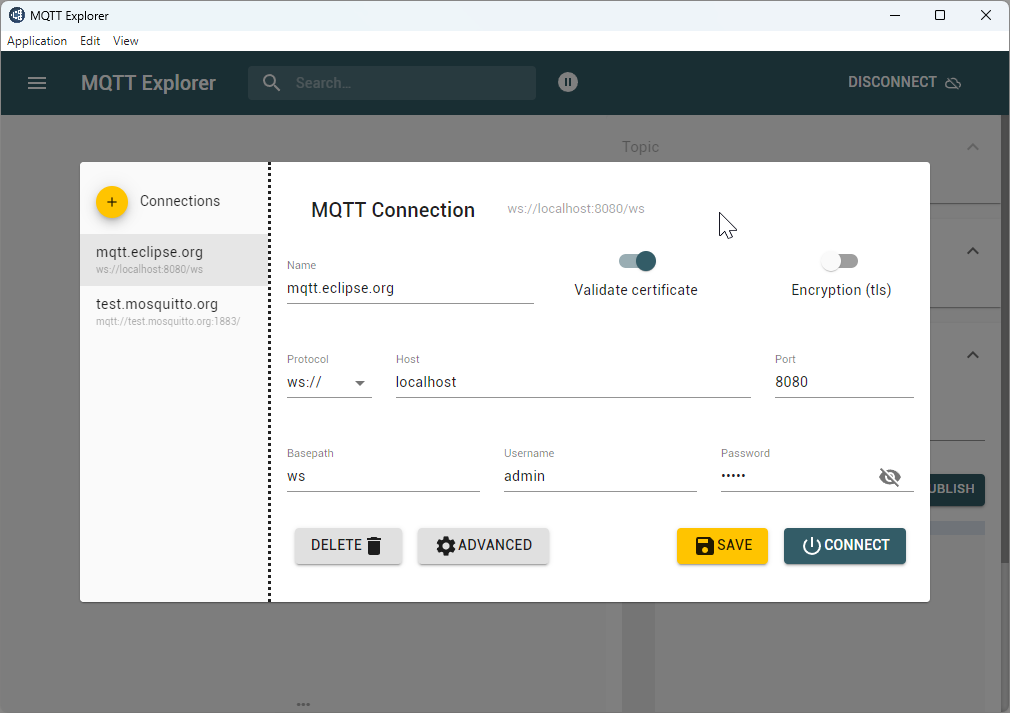
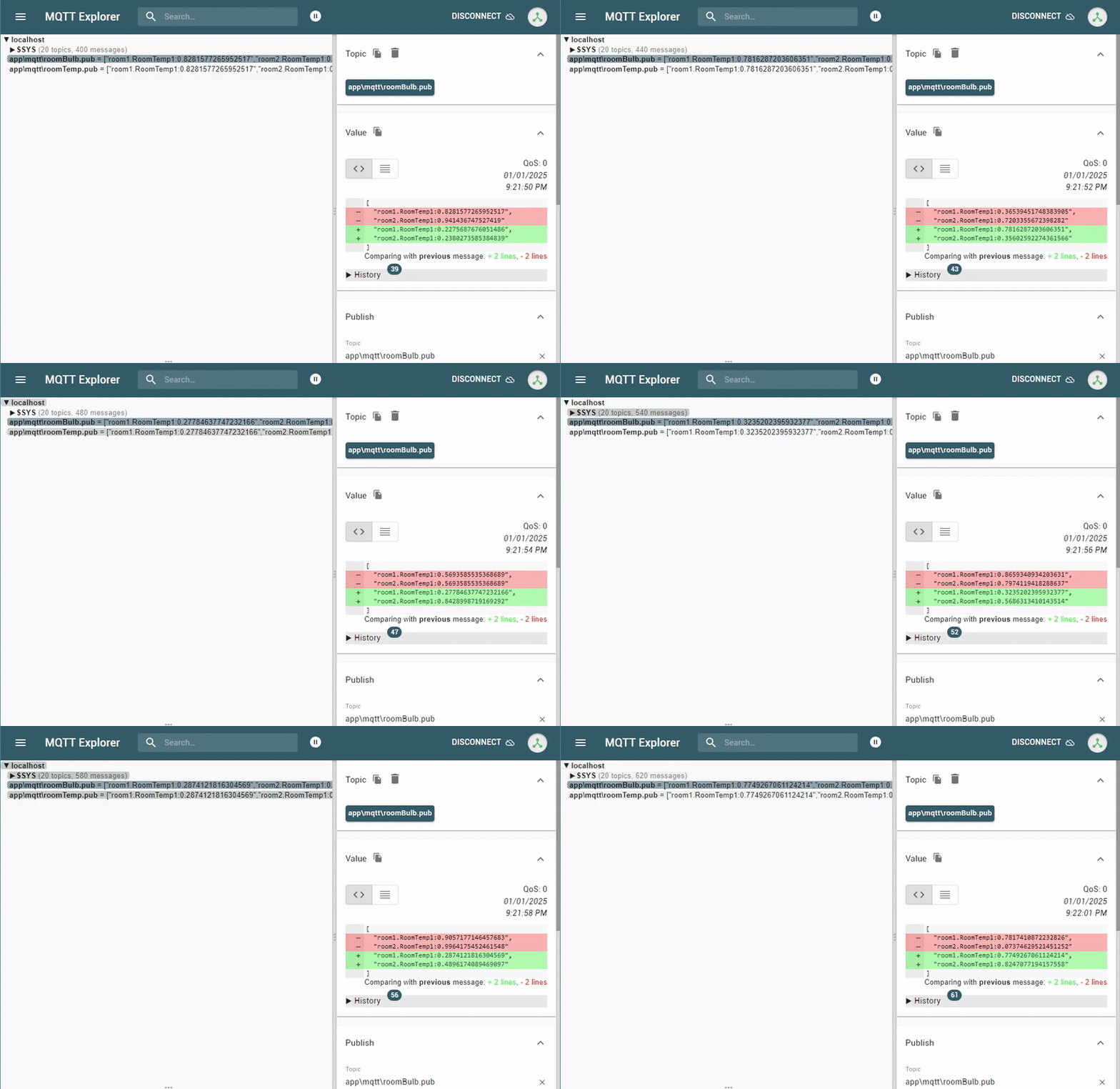
MQTT Explorer provides a visual interface to inspect topics and messages in real time.
| Field | Value |
|---|---|
| Host | 127.0.0.1 |
| Port | 8080 (WebSocket) or 1883 (MQTT) |
| Username | admin |
| Password | admin |
Publication File
Create a .pub file to declare which PortDIC data keys are published to MQTT topics:
File path: app/mqtt/room1.pub
room1 RoomTemp1   // [group-name] [message-name]
room2 RoomTemp1
Client Handler Mode
The handler pattern creates one independent MQTT client per class registration. This mode is backed by portmqttclient.dll and supports publish, subscribe, and full connection event callbacks.
1. Define an MQTT client class
using Portdic;
using Portdic.MQTT;

[MQTTHandler]
public class SensorClient
{
    [MQTTHandlerProp]
    public IMQTTHandler handler { get; set; } = null!;

    [Preset]
    private void Preset()
    {
        handler.SetHost("192.168.1.50");
        handler.SetPort(1883);
        handler.SetClientId("sensor-client-01");
        handler.SetUsername("user");
        handler.SetPassword("pass");

        handler.OnMessageReceived += OnMessage;
        handler.OnEvent += OnEvent;
    }

    private void OnMessage(string name, string topic, string payload, int qos)
    {
        Console.WriteLine($"[{name}] {topic}: {payload} (QoS {qos})");
    }

    private void OnEvent(string name, string eventType, string description)
    {
        Console.WriteLine($"[{name}] {eventType}: {description}");
        if (eventType == "CONNECTED")
        {
            handler.Subscribe("sensor/temperature/#");
            handler.Subscribe("sensor/humidity", qos: 1);
        }
    }
}
2. Register and run
Port.Add<SensorClient>("mqtt_sensor");
Port.Run();
Multiple broker connections
Each registration creates its own independent MQTT client:
Port.Add<LocalBrokerClient>("mqtt_local");
Port.Add<CloudBrokerClient>("mqtt_cloud");
Port.Run();
Publish and Subscribe
// Subscribe to a topic
handler.Subscribe("equipment/status");
handler.Subscribe("sensor/#", qos: 1);     // wildcard, QoS 1

// Publish a message
handler.Publish("equipment/status", "online");
handler.Publish("sensor/temp", "25.3", qos: 1, retain: true);

// Unsubscribe
handler.Unsubscribe("sensor/#");

// Disconnect
handler.Close();
QoS Levels
| Level | Guarantee | Description |
|---|---|---|
| QoS 0 | At most once | No delivery guarantee; possible message loss |
| QoS 1 | At least once | Guaranteed delivery; possible duplication |
| QoS 2 | Exactly once | Guaranteed delivery without duplication |
API Reference
Attributes
| Attribute | Target | Description |
|---|---|---|
[MQTTHandler] | Class | Marks the class as an MQTT client handler container |
[MQTTHandlerProp] | Property | Injects the IMQTTHandler instance |
[Preset] | Method | Called before Open() to configure the handler |
Configuration methods
| Method | Description |
|---|---|
SetHost(string host) | Broker address. Default: "127.0.0.1" |
SetPort(int port) | Broker port. Default: 1883 |
SetClientId(string clientId) | MQTT client ID. Defaults to the registration key if empty |
SetUsername(string username) | Broker authentication username |
SetPassword(string password) | Broker authentication password |
SetKeepAlive(int seconds) | Keep-alive interval in seconds. Default: 60 |
SetCleanSession(bool) | Discard previous session state on connect. Default: true |
Connection methods
| Method | Returns | Description |
|---|---|---|
Open() | ERROR_CODE | Connect to the MQTT broker |
Close() | ERROR_CODE | Disconnect from the broker |
IsConnected | bool | true if currently connected to the broker |
Publish / Subscribe methods
| Method | Returns | Description |
|---|---|---|
Publish(topic, payload, qos, retain) | int | Publish a message. Returns 0 on success |
Subscribe(topic, qos) | int | Subscribe to a topic filter. Returns 0 on success |
Unsubscribe(topic) | int | Unsubscribe from a topic. Returns 0 on success |
Logging
| Method | Description |
|---|---|
SetLogger(string rootPath) | Enable hourly-rotated log files. Format: mqtt_{name}_{date}_{hour}.log |
WriteLog(string message) | Write a custom entry to the log file |
Events
OnMessageReceived
Fired when a message arrives on a subscribed topic.
handler.OnMessageReceived += (string name, string topic, string payload, int qos) =>
{
    Console.WriteLine($"[{name}] {topic}: {payload}");
};
| Parameter | Description |
|---|---|
name | Client registration key |
topic | Topic the message was published on |
payload | Message payload as a UTF-8 string |
qos | QoS level (0, 1, or 2) |
OnEvent
Fired on connection state changes and errors.
handler.OnEvent += (string name, string eventType, string description) =>
{
    Console.WriteLine($"[{name}] {eventType}: {description}");
};
eventType | Triggered When |
|---|---|
CONNECTED | Connected to the broker |
DISCONNECTED | Disconnected from the broker |
SUBSCRIBED | Topic subscription confirmed |
UNSUBSCRIBED | Topic unsubscription confirmed |
PUBLISHED | Message published successfully |
ERROR | Error occurred (description contains detail) |
Error Codes
| Code | Value | Meaning |
|---|---|---|
ERR_CODE_NO_ERROR | 1 | Success |
ERR_CODE_OPEN | -1 | Open/connect failed |
ERR_CODE_DLL_NOT_LOADED | -2 | portmqttclient.dll not loaded |
ERR_CODE_PORTNAME_EMPTY | -3 | Client name not set |
ERR_CODE_DLL_FUNC_NOT_CONFIRM | -4 | Required DLL function unavailable |
ERR_CODE_CONNECT_FAILED | -5 | Connection attempt failed |